Blog
The Definitive Guide to Garage Door Remote Batteries
Door Serv Pro
Reviewed by the Door Serv Pro service team · Trained, professional garage door technicians
Last updated June 24, 2026
Why Your Garage Door Remote Batteries Matter More Than You Think
Garage door remote batteries are one of the smallest parts of your home — but when they die, everything stops. You're stuck in the driveway, pressing the button over and over, wondering if something expensive just broke.
The good news? In most cases, it's just the battery.
Here's a quick look at what you need to know:
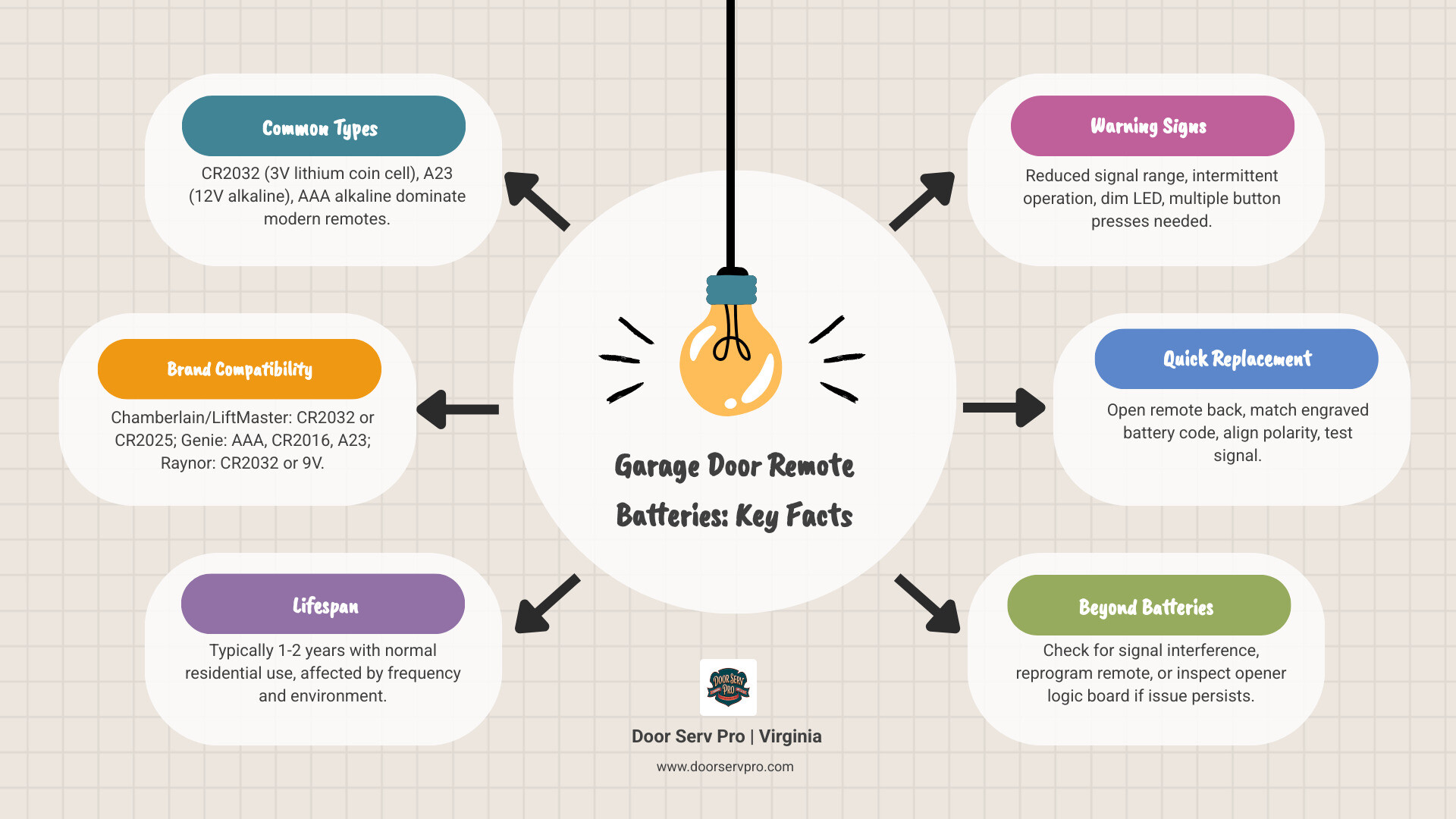
- Most common battery types: CR2032 (3V lithium coin cell), A23 (12V alkaline), AAA alkaline
- Most popular brands and their batteries:
- Chamberlain / LiftMaster: CR2032 (some older models use CR2025)
- Genie: AAA, CR2016, or A23 depending on the model
- Raynor: CR2032 for handheld remotes, 9V for wireless keypads
- How long they last: About 1–2 years with normal residential use
- Top warning signs: Reduced range, slow response, dim LED light, needing multiple button presses
- Quick fix: Pop open the back of your remote, match the battery code engraved on the old battery, and swap it out
It really is that simple — most of the time.
That said, not every dead remote is a dead battery. Sometimes the issue is signal interference, a lost sync with the opener, or a bigger problem with the unit itself. This guide covers all of it, so you know exactly what to do whether you're in the middle of a quick battery swap or dealing with something more stubborn.
At Door Serv Pro | Virginia, we've helped homeowners across the state troubleshoot garage door issues big and small. And we can tell you from experience: a surprising number of service calls come down to one tiny battery that needed replacing.
Let's make sure that never catches you off guard again.
Common Types of Garage Door Remote Batteries
When you open up your remote, you aren't always going to find a standard AA battery. In fact, most modern remotes use specialized power sources designed to provide a high burst of energy in a small package. In April 2026, as we look at the current market, three main categories dominate the industry.
CR2032 Lithium Coin Cells
This is the "king" of garage door remote batteries. It is a 3V lithium battery that looks like a small silver coin. It's incredibly popular because of its long shelf life—often up to 10 years—and its ability to perform well in the varying temperatures of a Virginia garage. Brands like LiftMaster and Chamberlain rely heavily on these. You might also see the CR2016 or CR2025; these are similar in diameter but differ in thickness.
A23 Alkaline Batteries
If you have an older remote or a specific type of keychain transmitter, you likely have an A23. This is a 12V cylindrical battery that looks like a "miniature" AAA. It’s powerful, but because it’s alkaline-based, it can be more prone to leaking if left in a hot car for several years.
AAA Alkaline Batteries
Some newer Genie remotes and many wireless keypads have moved toward standard AAA batteries. These are easy to find at any local store in Leesburg or Reston, making them a favorite for homeowners who want a quick DIY fix.
For a deeper dive into choosing the right hardware, check out our Garage Door Remote Replacement Complete Guide.
| Battery Type | Voltage | Common Use Case |
|---|---|---|
| CR2032 | 3V | Modern LiftMaster/Chamberlain remotes |
| A23 | 12V | Older remotes and some Genie actuators |
| AAA | 1.5V | Modern Genie remotes and wireless keypads |
| CR2016 | 3V | Slim keychain style remotes |
How to Identify the Correct Battery for Your Remote
Don't guess which battery you need. Using the wrong voltage can fry the delicate circuit board inside your remote. To identify the correct garage door remote batteries, start by looking at the back of the device. Most manufacturers stamp a model number into the plastic.
If the model number is worn off, you'll need to open the battery compartment. Most remotes have a small slot where you can insert a coin or a flathead screwdriver to pop the casing apart. Once inside, look at the battery itself. Lithium coin cells have the code (like CR2032) engraved right on the metal surface.
For more tips on the physical process of opening your device, see our guide on Garage Remote Battery Change.
Finding Garage Door Remote Batteries for Chamberlain and LiftMaster
Chamberlain and LiftMaster are industry leaders, and for the last several years, they have almost exclusively used the CR2032 3V lithium battery. However, if you have a very slim, older model, it might require a CR2025. While they look the same, the CR2025 is 2.5mm thick, while the CR2032 is 3.2mm. That tiny 0.7mm difference can cause a loose connection, making your remote work intermittently.
If your remote has three buttons and was manufactured before 2011, it might even use the A23 12V battery. If you’re struggling with a LiftMaster unit and a battery swap didn’t help, our Garage Remote Not Working Inwood Guide can help you dig deeper.
Selecting Garage Door Remote Batteries for Genie Systems
Genie systems are a bit more varied. Many of their modern "Intellicode" remotes use a single AAA battery, which is very convenient. However, their keychain-style remotes often use CR2016 or CR2032 coin cells.
If you have a Genie wireless keypad (the one mounted outside your garage), it likely uses two AAA batteries. A quick pro-tip for Genie owners: if your remote says "ACS" on the back, it likely takes an A23; if it says "TBS," it’s probably a CR2032. For our neighbors near the border, our Garage Door Remote Replacement Boonsboro MD Guide offers brand-specific insights.
Signs Your Remote Battery Needs Replacement
How do you know it's time for a change before you're stuck in the rain? Your remote will usually give you a few "hints" that the garage door remote batteries are fading:
- Reduced Signal Range: You used to be able to open the door from three houses down; now you have to be practically touching the garage door for it to work.
- Intermittent Operation: You press the button and... nothing. You press it again, and it works. This is a classic sign of a battery that can no longer provide a consistent voltage.
- Dim LED Indicator: Most remotes have a small light that flashes when you press a button. If that light is dim, flickering, or not lighting up at all, the battery is nearly dead.
- Keypad Backlight Failure: On wireless keypads, the buttons should light up so you can see them at night. If they stay dark, it's time for new batteries.
Regularly checking these signs is a key part of garage door maintenance services.
Step-by-Step Guide to Safely Replacing Batteries
Replacing garage door remote batteries is a straightforward DIY task, but there are a few safety and maintenance steps we recommend to ensure the remote lasts another 30 years.
Tools Needed:
- A small flathead screwdriver or a sturdy coin.
- A fresh battery (match the old code exactly).
- A cotton swab and a little rubbing alcohol (optional but recommended).
The Process:
- Open the Case: Locate the small notch on the side or bottom of the remote. Gently twist your screwdriver to pop the two halves apart.
- Remove the Old Battery: Take note of which way the "+" sign is facing. Usually, the positive side faces up toward you.
- Clean the Contacts: This is a step most people skip! Use a dry cotton swab (or one slightly dampened with rubbing alcohol) to wipe the metal tabs that touch the battery. This removes skin oils and minor corrosion, ensuring a perfect connection.
- Insert the New Battery: Slide the new battery in, ensuring the polarity (+ and -) matches the markings inside the case.
- Test Before Closing: Press the button. If the LED flashes brightly, snap the case back together.
- Proper Disposal: Never throw lithium coin cells in the trash. They are hazardous to the environment and can be a fire risk. Take them to a local recycling center in McLean or Vienna.
Troubleshooting When a New Battery Doesn't Fix the Issue
You’ve put in a brand-new battery, but the door still won’t budge. Don’t panic! There are a few other common culprits:
- Signal Interference: Believe it or not, some LED light bulbs installed in the garage door opener motor can put out a radio frequency that "jams" your remote signal. If you recently changed your garage light bulbs, try unscrewing them and testing the remote again.
- Lost Programming: Sometimes, when a battery stays dead for a long time, the remote "forgets" its connection to the motor. You may need to press the "Learn" button on the motor unit and then press the button on your remote to resync them.
- Locked Wall Console: Check your wall-mounted button inside the garage. Many have a "Lock" or "Vacation" mode. If this is toggled on, it will ignore all remote signals for security.
- The Motor Unit Battery: Some modern openers have a large 12V rechargeable backup battery inside the main motor housing. If this battery dies, the unit might beep constantly to alert you. This is a separate system from your handheld remote.
If you’ve tried a new battery and the resync process and still have no luck, it might be time for professional garage door repair services.
Frequently Asked Questions About Remote Power
How long do garage door remote batteries typically last?
In a typical residential setting where the door is opened 4–6 times a day, you can expect your garage door remote batteries to last about two years. However, Virginia’s climate plays a role. Extreme heat in the summer (especially if the remote stays in a hot car) and freezing winters can drain batteries faster. We recommend a proactive swap every 18 months to avoid getting stranded.
Do garage door openers themselves have batteries?
Yes, many do! Newer models, particularly those compliant with safety standards like California's SB-969 (which influenced national trends), feature a Battery Backup System. This is a large 12V rechargeable battery located inside the motor unit. It allows you to open and close your door even during a power outage—a lifesaver during those unpredictable Virginia storms.
Are batteries for remotes different than those for wireless keypads?
Often, yes. While remotes use small coin cells or A23s to stay compact, wireless keypads have more room. They frequently use 9V alkaline batteries or AA/AAA batteries. Keypads also face more "drain" because they have to power a backlight and a numeric processor, and they are exposed to moisture and humidity year-round.
Conclusion
At the end of the day, your garage door is the largest moving object in your home. While the battery in your remote is tiny, it's the gatekeeper to your home’s convenience and security.
At Door Serv Pro, we take pride in our 30+ years of craftsmanship and our deep roots in the Virginia community—from Ashburn to Stephens City. We are a family-owned business that treats every customer like a neighbor because you are our neighbors. Whether we’re supporting veterans through our philanthropic work or helping a homeowner in Front Royal fix a stubborn remote, our focus is always on excellence and reliability.
If you’ve swapped your garage door remote batteries and things still aren't working right—or if you're ready for a full system upgrade with a battery backup—we’re here to help.
Contact us for professional garage door assistance today, and let’s get your door moving again!
Need Help?
Contact us today to discuss your needs. Our team is ready to help.
About the author
Door Serv Pro
More articles
View all postsKeep reading
Related articles
Ready to Get Started?
Whether you need a repair, maintenance, or a new installation, our expert team is here to help.